Most AI conversations in leadership meetings still focus on the latest models and impressive demos. The quiet reality is this: your success with AI will be decided less by which model you pick and more by how well those models connect to your business tools and data. That is where MCP and MCP platforms come in for small and mid sized businesses.
What MCP Is in Plain Language
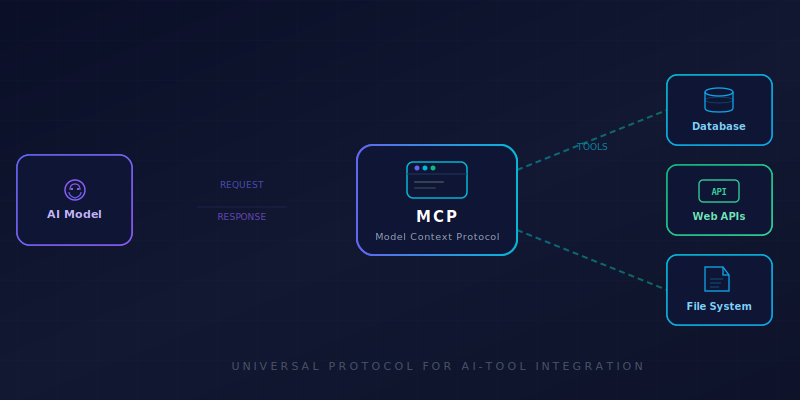
Model Context Protocol, or MCP, is simply a shared rulebook that lets AI systems talk to your tools and data in a consistent way. Instead of building a one off integration every time you want AI to work with a new app or database, MCP acts like a universal adapter between AI and your business systems.
In practical terms, this is what turns AI from “a smart chat box” into a useful digital worker. With MCP, AI can see the right data, follow your real processes, and take real actions, within clear boundaries that your team controls.
Why SMB Leaders Should Care
For most small and mid sized business leaders, the important questions are straightforward:
- How do we get AI out of pilots and into daily operations
- How do we avoid being stuck with one vendor we cannot easily leave
- How do we keep control over data, risk, and compliance as AI starts doing real work
MCP sits in the middle of all three. It affects how quickly you can plug AI into your systems, how easily you can change AI providers later, and how clearly you can define what AI is allowed to see and do.
You can think of MCP as the plumbing layer of your AI strategy. You rarely see it in a demo, but if the plumbing is weak, everything above it becomes harder, slower, and riskier.
From Single Tools to MCP Platforms
MCP started with individual connectors, called “servers,” that let AI talk to one tool at a time, such as a chat app, a code repository, or a database. Each one tells the AI how to safely read, search, or take actions in that specific system.
Now a new category is emerging: MCP platforms. These do more than connect to one app. They sit in the middle as a shared layer that:
- Connects many systems at once
- Applies consistent security and access rules
- Provides monitoring, logging, and governance
- Lets you swap or mix AI providers with less rework
For small and mid sized businesses, these platforms can cut down on custom integration work and make it easier to grow from one or two AI use cases to many.
Four MCP Platform Approaches
Here are four main approaches
1. Workflow first platforms
These build on existing automation tools that now support MCP. They shine when:
- You already use an automation platform to connect your apps
- You want AI to sit on top of the workflows and integrations you have
- You care about reusing proven “recipes” instead of starting from scratch
This approach is ideal if your first use cases involve automating tasks across SaaS tools and internal processes.
Workato MCP – An automation platform that added MCP so AI agents can trigger and use your existing recipes, integrations, and workflows instead of starting from zero.
2. Data first platforms
These focus on connecting your data sources and then exposing that data to AI securely. They are helpful when:
- Your main challenge is safely giving AI access to scattered data
- You want clear control over who and what can see which data
- You want to avoid building new data pipelines for every AI idea
This is a good fit if your early AI projects are about search, analysis, and insights across many systems.
CData Connect / Connect Cloud with MCP – Provides live, governed connections from AI to databases and SaaS apps through MCP, so you can expose data without rebuilding pipelines.
3. Cloud stack platforms
Large cloud providers are building MCP into their own ecosystems: email, documents, chat, cloud, and developer tools. This helps when:
- You already live inside one provider’s tools day to day
- You want AI that works naturally inside those same tools
- You trust that provider’s security and compliance story
This approach fits SMBs that have standardized on a single cloud and want to keep things simple.
Microsoft MCP stack, Google, AWS all large cloud providers have their own version of MCP gateways.
4. Neutral or managed MCP gateways
These sit between your AI tools and your systems as a separate layer, sometimes open source, sometimes fully managed as a service. They help when:
- You want one place to manage how AI connects to many systems
- You want to stay flexible across AI and cloud vendors
- You would like monitoring, logging, and policy controls in one spot
A managed gateway can be a practical bridge if you want speed now and may build more in house capabilities later.
MintMCP Gateway – A managed MCP gateway with built in security, monitoring, and prebuilt connectors so teams can go live quickly without hosting their own platform.
How SMB Leaders Can Move Forward
You do not need to pick the perfect MCP approach on day one. What matters is adding MCP to the conversation when you discuss AI pilots, automation, or new tools.
A simple way to start is to ask your leadership team three questions:
- Where do we want AI to act first: workflows, data, or collaboration tools
- Do we value faster results more right now, or more control and flexibility later
- How many core vendors do we realistically want to depend on for our AI “plumbing”
Your answers will point you toward the right kind of MCP platform and help you make AI investments that can grow with your business instead of painting you into a corner.